





Solana has become an important blockchain ecosystem for cryptocurrency transfers, decentralised finance (DeFi), NFTs, token trading and blockchain-based applications. As more people explore SOL and Solana-based tokens, choosing a reliable cryptocurrency wallet is one of the first steps towards using the network.
A Solana wallet allows users to store and manage access to their digital assets, send and receive SOL, hold tokens, connect to decentralised applications and, in some cases, stake SOL to participate in network security.
However, beginners often find it difficult to choose between the different wallets available. Some wallets focus on simplicity, while others provide advanced trading features, NFT management, staking or hardware-based security.
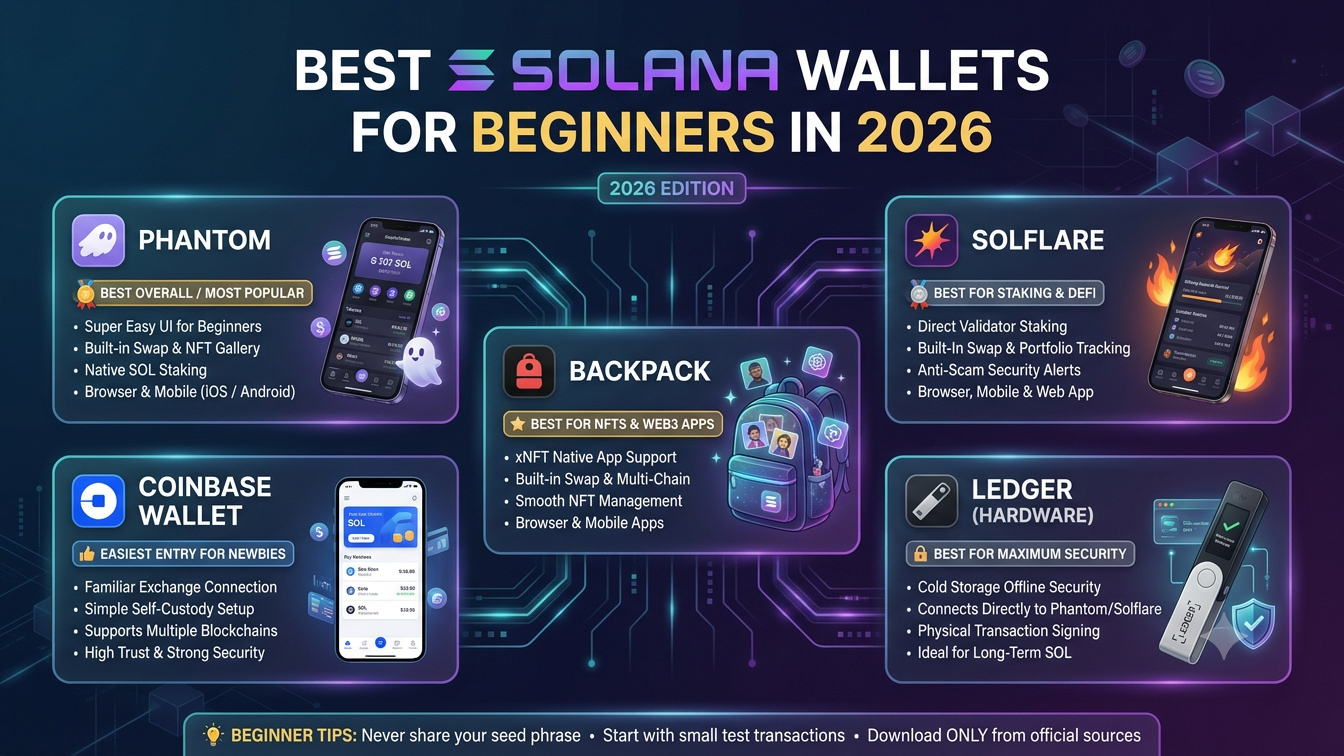
In this guide, we compare the best Solana wallets for beginners in 2026, including Phantom, Solflare, Backpack, Jupiter Wallet and Ledger hardware wallets. We also explain how Solana wallets work, what features to consider, how to create a wallet and how to protect your cryptocurrency.
1. What Is a Solana Wallet?
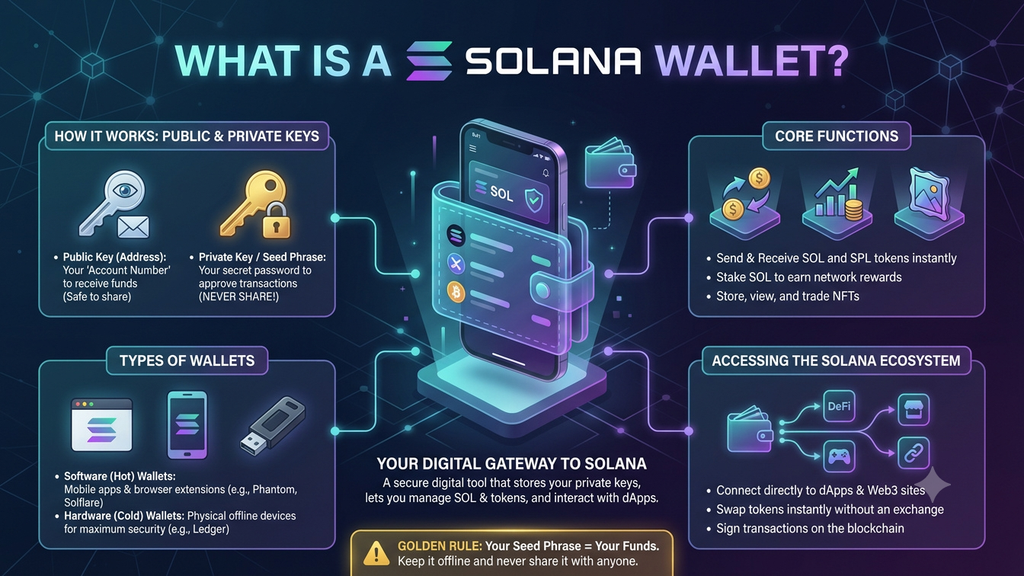
A Solana wallet is a software application or hardware device that helps users manage their digital assets on the Solana blockchain.
It allows users to access their SOL, Solana-based tokens and NFTs. A wallet can also connect to decentralised applications, including token exchanges, lending platforms, NFT marketplaces and blockchain games.
One important thing beginners should understand is that a cryptocurrency wallet does not literally store coins inside the application. Your assets are recorded on the blockchain. The wallet manages the cryptographic keys that allow you to access and authorise transactions involving those assets.
What can you do with a Solana wallet?
A typical Solana wallet can help you:
- Send and receive SOL.
- Hold Solana-based tokens.
- View supported NFTs.
- Connect to decentralised applications.
- Swap supported cryptocurrencies.
- Stake SOL through supported features.
- Review transaction activity.
- Manage accounts and wallet addresses.
The available features depend on the wallet provider, device and supported blockchain services.
2. Best Solana Wallets for Beginners in 2026: Quick Comparison
Here are five options worth considering when choosing a Solana wallet.
| Wallet | Wallet Type | Best For | Main Features |
|---|---|---|---|
| Phantom | Software wallet | Beginners and everyday use | SOL, tokens, NFTs, swaps and multi-chain support |
| Solflare | Software wallet | Solana-focused users and staking | SOL staking, tokens, NFTs and hardware integration |
| Backpack | Software wallet | NFTs and advanced users | Solana applications, NFTs and multi-chain support |
| Jupiter Wallet | Software wallet | Token swaps and active traders | Solana swaps, transfers and trading-focused features |
| Ledger | Hardware wallet | Long-term asset protection | Offline private-key storage and transaction signing |
3. Phantom Wallet – Best Overall for Beginners
Phantom is one of the most recognised software wallets in the Solana ecosystem. It is designed to make cryptocurrency management easier for users who want to send, receive and manage digital assets through a straightforward interface.
The wallet originally focused on Solana but now supports multiple blockchain networks, making it useful for people who hold assets across different ecosystems.
Insert official Phantom wallet screenshot or product image here
Key features of Phantom
- Supports SOL and compatible Solana tokens.
- Provides mobile applications and browser extensions.
- Supports NFTs and digital collectibles.
- Offers token swaps through supported services.
- Connects to Solana decentralised applications.
- Supports multiple blockchain networks.
- Provides hardware-wallet integration.
- Includes transaction and security prompts.
Why is Phantom suitable for beginners?
Phantom offers a relatively straightforward wallet experience. Users can create a wallet, receive SOL, check token balances and connect to supported applications without needing extensive technical knowledge.
Its multi-chain support is also useful for beginners who may eventually explore Ethereum and other supported networks.
Advantages
- Simple interface for everyday wallet activities.
- Supports mobile and browser access.
- Useful for managing tokens and NFTs.
- Supports more than one blockchain ecosystem.
- Suitable for beginners exploring decentralised applications.
Limitations
- Users must still understand private-key and recovery-phrase security.
- Some features depend on third-party providers and regional availability.
- Multi-chain support does not mean every token or network is supported.
Best for: Beginners who want an easy-to-use wallet for everyday Solana activity and access to other supported blockchain networks.
4. Solflare Wallet – Best for Solana Staking
Solflare is a self-custody wallet designed specifically for the Solana ecosystem. It supports SOL, tokens, NFTs, staking and connections to decentralised applications.
Because it focuses on Solana, it can be a useful option for people who want to explore the network beyond basic transfers.
Insert official Solflare wallet screenshot or product image here
Key features of Solflare
- Supports SOL and Solana-based tokens.
- Provides mobile applications and browser extensions.
- Supports SOL staking.
- Offers token swapping features.
- Supports NFTs and decentralised applications.
- Integrates with compatible hardware wallets.
- Provides transaction review and security features.
Why choose Solflare?
Solflare is particularly useful for users interested in staking SOL.
Through supported staking features, users can select a validator and delegate their SOL. Staking rewards are variable and depend on network conditions, validator performance and applicable protocol rules.
Its Solana-focused design also makes it relevant for users who regularly interact with Solana applications.
Advantages
- Designed specifically for Solana.
- Supports staking and validator selection.
- Provides token and NFT management.
- Offers browser and mobile access.
- Supports compatible hardware-wallet integrations.
Limitations
- Its Solana-focused approach may not suit users who want one wallet for many unrelated networks.
- Some features involve third-party services.
- Staking requires an understanding of activation, deactivation and validator-related risks.
Best for: Beginners who want to explore SOL staking and use Solana applications regularly.
5. Backpack Wallet – Best for NFTs and Advanced Solana Features
Backpack is a self-custody wallet that supports Solana and multiple EVM-compatible networks. It is known for its focus on Solana applications, NFTs and more advanced wallet functionality.
It can be useful for users who want to explore digital collectibles and decentralised applications while also managing assets across supported networks.
Insert official Backpack wallet screenshot or product image here
Key features of Backpack
- Supports Solana and selected EVM networks.
- Provides browser and mobile wallet access.
- Supports NFTs and digital assets.
- Includes token-management functionality.
- Supports compatible hardware-wallet integrations.
- Provides features designed for more advanced users.
- Supports xNFT-related experiences within its ecosystem.
Why choose Backpack?
Backpack offers more than basic SOL storage. Its NFT and application-focused features make it relevant for people who want to explore different parts of the Solana ecosystem.
Its multi-chain functionality may also appeal to users who hold assets outside Solana.
Advantages
- Useful for NFT-focused users.
- Supports multiple blockchain networks.
- Provides access to Solana applications.
- Offers additional functionality for experienced users.
- Supports compatible hardware-wallet workflows.
Limitations
- Some advanced features may take time for beginners to understand.
- Users should verify network compatibility before transferring tokens.
- Application features and integrations can change over time.
Best for: Beginners who are particularly interested in NFTs and users who expect to explore more advanced Solana applications.
6. Jupiter Wallet – Best for Solana Token Swaps
Jupiter is a major Solana ecosystem platform known for its decentralised trading and liquidity-routing services. Its wallet offering provides users with a way to manage Solana assets and interact with its trading-focused ecosystem.
It is worth considering for users who expect to swap tokens regularly.
Insert official Jupiter wallet screenshot or product image here
Key features of Jupiter Wallet
- Supports SOL and Solana-based assets.
- Provides mobile and browser wallet access.
- Offers token swap functionality.
- Supports wallet transfers.
- Connects users with Jupiter’s trading ecosystem.
- Includes supported fiat access and payment integrations, depending on region.
Why choose Jupiter Wallet?
Jupiter’s ecosystem is particularly relevant to users who want to explore token swaps and decentralised trading on Solana.
Instead of relying only on a general-purpose wallet, users can access a wallet experience connected to a trading-focused platform.
However, beginners should understand that a wallet and a decentralised exchange are different things. A wallet manages access to assets, while an exchange or swap service helps execute trades.
Advantages
- Closely connected to Solana’s trading ecosystem.
- Useful for token swaps.
- Supports everyday wallet activities.
- Provides access to additional Jupiter services.
- Offers mobile and browser options.
Limitations
- Its trading-focused features may be unnecessary for users who only want to hold SOL.
- Swap prices and fees can vary.
- Beginners should understand slippage and transaction details before trading.
Best for: Users who want to manage Solana assets and regularly explore token swaps.
7. Ledger – Best Hardware Wallet for Long-Term SOL Storage
Ledger is different from the software wallets discussed above. It produces hardware wallets designed to keep private keys protected within a dedicated physical device.
A hardware wallet is useful for people who want additional protection for cryptocurrency holdings, particularly when they do not need to access those assets frequently.
Insert official Ledger hardware wallet product image here
Key features of Ledger
- Keeps private keys within a dedicated hardware device.
- Requires physical approval for supported transactions.
- Supports SOL through compatible wallet software.
- Supports multiple cryptocurrencies and networks.
- Can be integrated with compatible wallet applications.
- Offers a separate security layer from an internet-connected computer or phone.
Why choose Ledger?
With a software wallet, private keys are managed through an application on a connected device. A hardware wallet keeps the signing keys isolated within the hardware device.
When a transaction is prepared, the user reviews and approves it on the device. This helps protect the keys from many online threats, although it cannot eliminate every risk.
A hardware wallet is particularly useful for people who hold larger amounts of SOL or want to keep assets for an extended period.
Advantages
- Offline private-key protection.
- Physical transaction approval.
- Suitable for long-term asset storage.
- Supports multiple cryptocurrency ecosystems.
- Can be used alongside compatible software wallets.
Limitations
- Requires purchasing a physical device.
- Beginners must learn how to set it up correctly.
- Losing the recovery phrase can result in permanent loss of access.
- Users must verify the exact device and software compatibility.
Best for: Users who prioritise long-term storage and want hardware-based protection for their SOL holdings.
8. Hot Wallet vs Cold Wallet: Which Should Beginners Choose?
Before selecting a Solana wallet, it is important to understand the difference between hot wallets and cold wallets.
What is a hot wallet?
A hot wallet is connected to the internet through a mobile application, browser extension or desktop application.
Examples include:
- Phantom.
- Solflare.
- Backpack.
- Jupiter Wallet.
Hot wallets are convenient for daily activities such as sending SOL, receiving tokens, swapping assets and connecting to decentralised applications.
However, internet-connected devices can be exposed to phishing attacks, malware, malicious browser extensions and fraudulent applications.
What is a cold wallet?
A cold wallet keeps private keys offline or isolated from ordinary internet-connected devices. Hardware wallets such as Ledger are commonly used for this purpose.
They can provide stronger protection against certain online threats, but users still need to secure their recovery phrases and verify transactions carefully.
Hot wallet vs cold wallet comparison
| Feature | Hot Wallet | Cold Wallet |
|---|---|---|
| Internet connection | Connected through an online device | Private keys kept offline or isolated |
| Convenience | High | Requires additional steps |
| Daily transactions | Suitable | Less convenient |
| Security approach | Software-based key management | Hardware-based key protection |
| Typical cost | Often free to download | Usually requires buying hardware |
| Best use | Everyday transfers and applications | Long-term storage |
Which is better for beginners?
A software wallet is usually easier for someone making their first Solana transaction. However, people holding substantial assets should consider a hardware wallet.
Some users maintain two wallets: a small-balance hot wallet for everyday activity and a hardware wallet for longer-term holdings.
9. How to Choose the Best Solana Wallet in 2026
Not every wallet is suitable for every user. Before choosing one, compare the following factors.
1. Security and self-custody
Check how the wallet manages private keys and recovery phrases.
With a self-custody wallet, you control the keys. This gives you greater control over your assets, but also makes you responsible for securing access.
2. Ease of use
Beginners should look for a wallet with a clear interface, straightforward account creation and understandable transaction confirmations.
A complicated interface can increase the likelihood of mistakes.
3. Supported networks
Some wallets focus on Solana, while others support multiple blockchains.
If you plan to hold only SOL and Solana-based tokens, a Solana-focused wallet may be sufficient. If you use multiple ecosystems, multi-chain support may be more convenient.
4. Staking support
If you plan to stake SOL, check whether the wallet supports validator selection, delegation and stake-account management.
Also understand that staking rewards are not guaranteed and that unstaking can involve a waiting period.
5. Token and NFT management
Check whether the wallet supports the tokens and NFTs you intend to use.
Do not assume that every asset or token extension will be displayed or supported in every wallet.
6. Hardware wallet compatibility
If you want stronger protection for long-term holdings, check whether your preferred software wallet supports a compatible hardware device.
7. Fees and third-party services
Creating a wallet is often free, but using it may involve network fees, swap charges, purchase-provider fees or other service costs.
Always review the total cost before confirming a transaction.
10. How to Create a Solana Wallet: Step-by-Step Guide
Creating a Solana wallet is relatively straightforward. The exact steps differ between providers, but the general process is similar.
For this example, we will use a typical self-custody software wallet setup.
Step 1: Select a wallet
Choose a wallet from a recognised provider, such as Phantom or Solflare.
Visit the provider’s official website and follow its links to the official mobile application or browser extension.
Avoid downloading wallet applications through advertisements, unsolicited messages or unknown websites.
Step 2: Install the wallet
Install the official application on your phone or the verified browser extension on your computer.
Check the developer and application details before installing.
Step 3: Create a new wallet
Open the application and choose the option to create a new wallet.
Depending on the provider, you may be offered a recovery phrase, an alternative backup method or a supported account-recovery feature.
Step 4: Secure your recovery phrase
If your wallet provides a recovery phrase, write it down and store it somewhere private and secure.
Never:
- Share it with another person.
- Send it through email or messaging applications.
- Enter it into an unfamiliar website.
- Store it in an unprotected online document.
- Share it with someone claiming to be wallet support.
Anyone who obtains the recovery phrase may be able to control the associated wallet.
Step 5: Set up wallet protection
Enable available security options, such as a strong password, device lock or biometric authentication.
These features protect access to the application, but they do not replace recovery-phrase security.
Step 6: Find your Solana wallet address
After creating the wallet, locate the receive option.
Your wallet will display a public address that other users can use to send SOL or supported tokens to you.
Copy the address carefully and confirm that it belongs to the correct network.
Step 7: Receive a small amount of SOL
If you are receiving SOL for the first time, consider testing with a small amount.
Wait for the transaction to confirm and check that the funds appear in your wallet.
Step 8: Explore wallet features carefully
Once you understand basic transfers, you can explore token swaps, staking, NFTs and decentralised applications.
Do not approve transactions you do not understand.
11. How to Keep Your Solana Wallet Safe
Choosing a reliable wallet is only one part of cryptocurrency security. Your own habits play an equally important role.
Here are practical steps to help protect your SOL and other digital assets.
Keep your recovery phrase private
Your recovery phrase is one of the most important pieces of information associated with a self-custody wallet.
Store it offline in a secure location and never share it with anyone.
Download applications from official sources
Fake wallet applications and browser extensions can steal private keys and recovery phrases.
Always use the official provider website to find download links.
Verify every transaction
Before approving a transaction, check:
- The recipient address.
- The amount being transferred.
- The network being used.
- The transaction fee.
- The application requesting approval.
- The permissions or instructions included.
Avoid suspicious links
Do not click unknown airdrop, giveaway or NFT minting links sent through social media or private messages.
Scammers frequently create websites that imitate genuine cryptocurrency services.
Use a separate wallet for risky activities
Consider keeping a small-balance wallet for testing unfamiliar applications and interacting with new protocols.
Keep larger holdings separate from everyday activity.
Consider hardware protection
If you hold significant cryptocurrency assets, consider a hardware wallet that supports Solana.
Always verify the transaction details on the physical device before approving.
Be careful with wallet permissions
Connecting a wallet to an application is not the same as approving a transaction. Review every signing request and token approval carefully.
Disconnecting an application may not automatically revoke every on-chain permission or token delegate.
12. Common Mistakes Beginners Should Avoid
New Solana users sometimes lose funds because they misunderstand wallet operations or approve suspicious transactions.
Avoid these common mistakes:
1. Sending tokens to the wrong network: SOL and tokens on Solana should not be confused with assets on Ethereum or other networks. Always check network compatibility.
2. Sharing recovery phrases: Legitimate wallet support should never need your recovery phrase or private key.
3. Ignoring transaction details: Read the signing request before approving it.
4. Trusting free-token offers: Unsolicited token airdrops and giveaway websites may be scams.
5. Keeping all assets in one hot wallet: Separating daily-use funds from longer-term holdings can reduce exposure.
6. Ignoring network fees: Keep enough SOL available to cover relevant network fees when using Solana applications.
7. Assuming wallet providers can reverse transactions: Blockchain transactions are generally irreversible once finalised. A wallet provider cannot normally undo a completed on-chain transfer.
8. Downloading fake wallet applications: Always verify the provider and download source.
13. Which Solana Wallet Is Best for Different Types of Users?
The best wallet depends on how you intend to use the Solana ecosystem.
| User Type | Recommended Wallet | Reason |
|---|---|---|
| First-time Solana user | Phantom | Straightforward everyday wallet experience |
| SOL staking beginner | Solflare | Solana-focused staking features |
| NFT enthusiast | Backpack | NFT and application-focused functionality |
| Frequent token swap user | Jupiter Wallet | Trading-focused Solana ecosystem |
| Long-term SOL holder | Ledger | Hardware-based private-key protection |
14. Are Solana Wallets Free to Use?
Most software wallets can be downloaded and created without paying a wallet setup fee.
However, using a wallet may involve other costs.
For example:
- Solana network transaction fees.
- Token swap fees.
- Third-party cryptocurrency purchase fees.
- Payment processing charges.
- Hardware wallet purchase costs.
- Fees charged by external applications.
The exact amount depends on the transaction, provider and network conditions.
A wallet may advertise free downloads, but that does not mean every activity inside it is free.
15. Final Recommendation: Which Solana Wallet Should Beginners Choose in 2026?
There is no single Solana wallet that is ideal for everyone.
For most first-time users, Phantom is a convenient starting point because it provides a straightforward interface for everyday wallet activity. Solflare is worth considering if you are interested in SOL staking and Solana-specific features.
Backpack is a useful option for users interested in NFTs and more advanced applications, while Jupiter Wallet is relevant for people who frequently swap Solana tokens.
For long-term storage, Ledger provides a hardware-based security option that can be used alongside compatible wallet software.
Before choosing any wallet, check its official website, supported networks, recovery process and security features. Start with a small amount, understand how transactions work and never share your private keys or recovery phrase.
Final Thoughts
Choosing the best Solana wallet in 2026 comes down to convenience, security and the features you need. Phantom and Solflare are practical options for beginners, Backpack suits users interested in NFTs, Jupiter Wallet supports trading-focused activity, and Ledger offers hardware-based protection for longer-term holdings.
The most important part of using any cryptocurrency wallet is understanding how private keys, recovery phrases and transaction approvals work. Take time to learn the basics before moving significant funds, and treat wallet security as an ongoing responsibility.
Enjoying Cryptorevery?
If you find our crypto insights and market updates helpful, add Cryptorevery as a Preferred Source on Google to see more of our latest content.
Found this article useful?
If this content helped you, you may support the developer by contributing the cost of a coffee.
Pay $5

